Channels
A channel represents a specific visual quantity that can be used to encode data. For example, 2D data visualization often encodes data in position, color, shape and size channels. Similarly in 3D data visualization, we can encode data in position, normal, size and vector field channels. In addition, we have the freedom of inventing new visual channels thanks to the diverse material models that modern rendering engines support. We have a separate guide for material-based channels. In this guide, we will mainly focus on non-material channels.
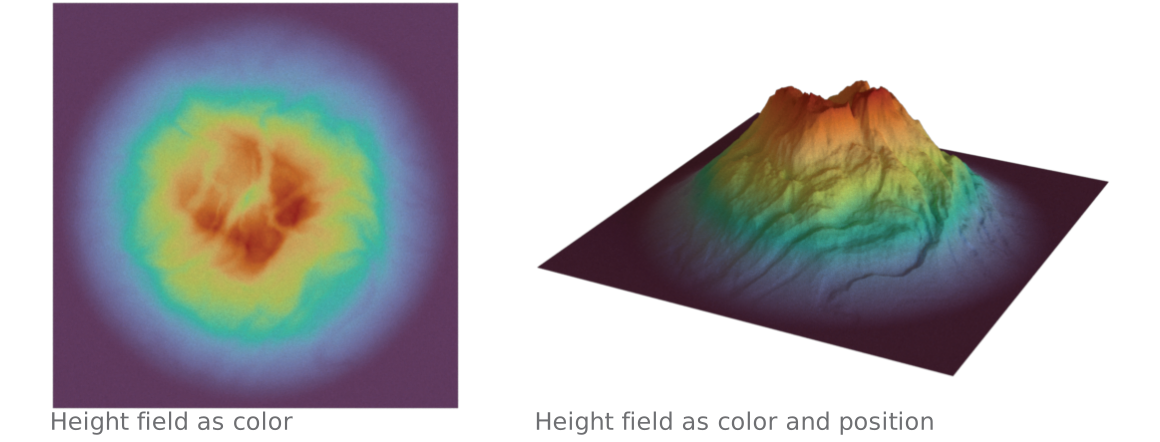
In the simple landscape example1 above, we use color (a visual channel defined in a material) to encode the height field attribute on the left, and use color + position to encode the same height field on the right.
Channels can be specified via Layer.channel() function.
# Assume `ch1` is a `Position` channel object,
# and `ch2` is a `Normal` channel object.
l = hkw.layer().channel(position=ch1, normal=ch2)
Position channel
Position channel represents the position of 3D marks. By default, the position channel will
use the vertex positions stored in the data frame. It is especially useful when multiple sets of
positions are available (e.g. animation or decimation).
| Channel | Type | Description |
|---|---|---|
data |
AttributeLike | The position attribute |
# To specify an attribute as the position channel data:
ch = hkw.channel.Position(data = hkw.attribute(name = "attr_name"))

# A shorthand that is exactly the same as above.
ch = hkw.channel.Position(data = "attr_name")
Normal channel
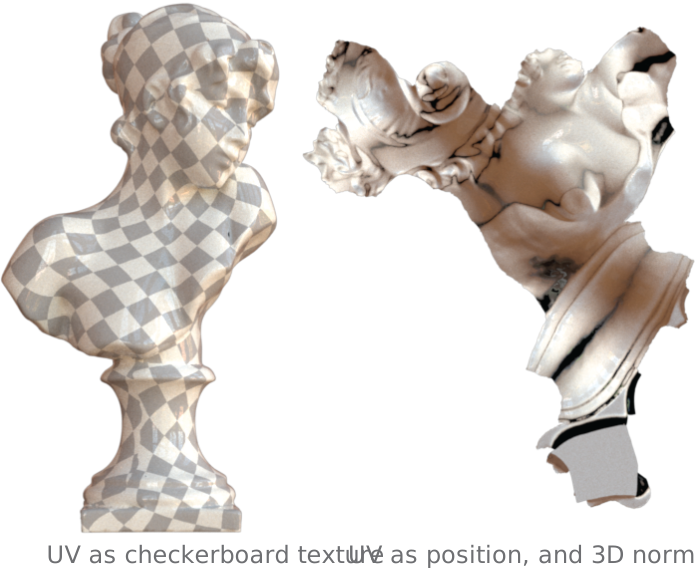
Normal channel represents the normal vector field of a 3D surface. It has significant influence on
how the surface reflect lights. By default, normals will be computed from the 3D data frame. The
Normal channel is only relevant for Surface mark.
For example, a common technique to visualize UV is to show the 2D UV mesh along with the 3D normal field. The example2 on the right illustrate this technique (right) as well as visualizing UV using checkerboard texture (left).
| Channel | Type | Description |
|---|---|---|
data |
AttributeLike | The normal attribute |
# To specify an attribute as the normal channel data:
ch = hkw.channel.Normal(data = hkw.attribute(name = "attr_name"))

# Shorthand. Same as above
ch = hkw.channel.Normal(data = "attr_name")
Size channel
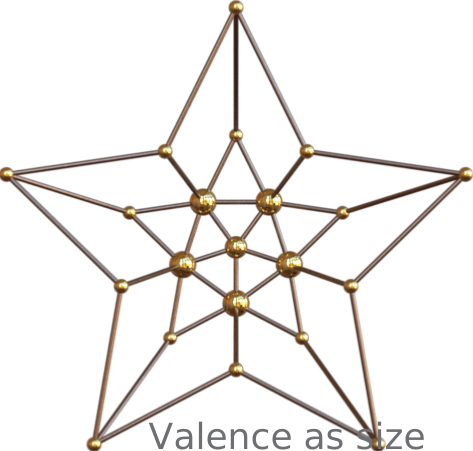
Size controls point and curve thickness. The numeric value has different
units according to space:
space |
Numeric value | Result |
|---|---|---|
"world" |
Radius in input geometry units | Diameter is 2 * data; scales with geometry transforms. |
"scene" |
Diameter divided by the compiled scene or ROI-box diagonal | data=0.005 gives a diameter equal to 0.5% of that diagonal. |
"screen" |
Diameter in output pixels | Exact at the camera target plane; perspective depth changes apparent width away from it. |
The default Size.space is "world" for compatibility. High-level edge
helpers can choose a different space explicitly.
On the simple star example to the right, the vertex valence of the graph is mapped to the size channel of the points. The edges are of uniform size.
| Channel | Type | Description |
|---|---|---|
data |
AttributeLike | float | Attribute or constant value interpreted according to space |
space |
"world" | "scene" | "screen" |
Coordinate system and units for data |
# To specify an attribute as the size channel data:
ch = hkw.channel.Size(data = hkw.attribute(name = "attr_name"))

# Shorthand. Same as above
ch = hkw.channel.Size(data = "attr_name")

# Constant world-space radius: 0.1 geometry units.
world = hkw.channel.Size(data=0.1, space="world")

# Constant scene-relative diameter: 0.5% of the scene/ROI diagonal.
scene = hkw.channel.Size(data=0.005, space="scene")

# Constant screen-space diameter: 0.5 pixels at the target plane.
screen = hkw.channel.Size(data=0.5, space="screen")
Attribute-driven size is supported in world space. Scene- and screen-relative sizes require a numeric constant.
To scale marks by the magnitude of a vector field, pass a hkw.norm()
attribute as the size data:
# Point/curve radius proportional to a vector field's magnitude.
ch = hkw.channel.Size(data = hkw.norm("velocity"))
Vector field channel
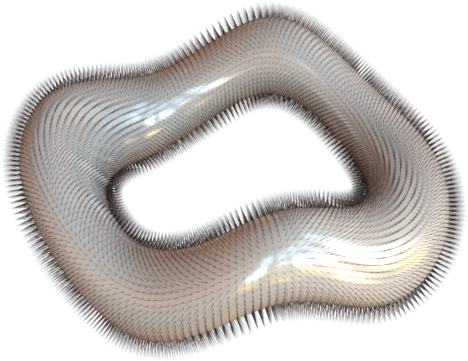
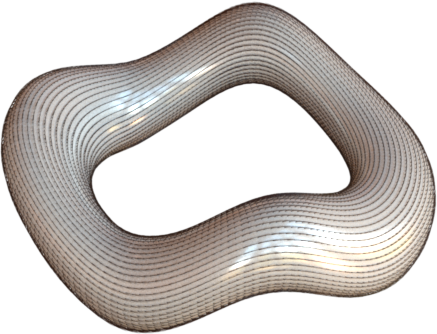
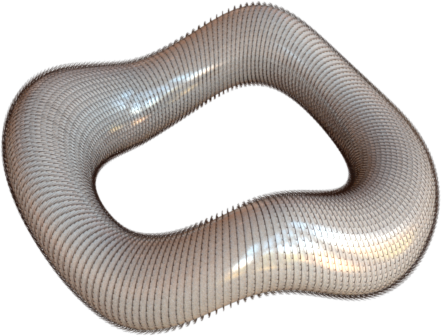
VectorField channel defines the data used for a vector field visualization. This channel is only
relevant when the mark is Curve as each vector is rendered using the curve geometry.
The example3 above shows the normal, tangent and bitangent vector field visualization in hair material.
| Channel | Type | Description |
|---|---|---|
data |
AttributeLike | The attribute containing vector field data |
Here is a snippet for creating a VectorField channel.
# To specify an attribute as the vector field channel data.
ch = hkw.channel.VectorField(data = hkw.attribute(name = "attr_name"))

# Shorthand, same as above.
ch = hkw.channel.VectorField(data = "attr_name")
Note that each vector in the vector field is visualized as a b-spline curve. By default, the vector
field's magnitude determines the curve length. The Size channel defines the thickness of the curve.
Vector field channel also takes the following parameters.
| Parameter | Type | Description |
|---|---|---|
refinement_level |
int |
The refinement level (default: 0) |
end_type |
str |
The end type of each vector (options: point (default), arrow) |
style |
CurveStyle | The curve style to use (default: None) |
normalize |
bool |
If True, rescale every vector to unit length so arrows encode direction only (default: False) |
Encoding magnitude
By default, each arrow's length is proportional to the vector's magnitude. Set normalize=True to
draw all arrows at the same length (direction-only); the magnitude is then freed up to be mapped to
another channel. Because normalization is applied before any scale attached to data, a uniform
scale on data controls the common arrow length:
# Direction-only arrows, all with length 0.1.
ch = hkw.channel.VectorField(
    data=hkw.attribute("velocity", scale=hkw.scale.Uniform(factor=0.1)),
    normalize=True,
)
To also convey magnitude when normalizing, map it to size or color with the
hkw.norm() shorthand:
l = (
    hkw.layer(data=mesh, mark=hkw.mark.Curve)
    .channel(
        vector_field=hkw.channel.VectorField(data="velocity", normalize=True, end_type="arrow"),
        # Tube radius proportional to magnitude.
        size=hkw.norm("velocity", scale=hkw.scale.Normalize(range_min=0.004, range_max=0.012)),
        # Color by magnitude.
        material=hkw.material.Diffuse(
            reflectance=hkw.texture.ScalarField(data=hkw.norm("velocity"))
        ),
    )
)
Covariance channel
Covariance channel defines the covariance matrix for point marks, allowing you to visualize
uncertainty or anisotropic data at each point. This channel is only relevant for Point mark.
The covariance matrix defines the stretch and rotation applied to each point shape.
| Channel | Type | Description |
|---|---|---|
data |
AttributeLike | The attribute containing covariance data |
full |
bool |
If True, the full 3x3 covariance matrix is stored. If False (default), the "square root" matrix M is stored where Σ = M @ M^T |
# To specify an attribute as the covariance channel data:
ch = hkw.channel.Covariance(data="covariance_attr", full=True)

# Shorthand, same as above
ch = hkw.channel.Covariance(data="covariance_attr")
Shape channel
Shape channel defines the base shape used to visualize points. This channel is only relevant for
Point mark and allows you to use different shapes (sphere, cube, disk) for point visualization.
| Channel | Type | Description |
|---|---|---|
base_shape |
str |
The base shape: "sphere" (default), "cube", or "disk" |
orientation |
AttributeLike or None |
The attribute defining the orientation of each shape (default: None) |
# Use cubes for point visualization
ch = hkw.channel.Shape(base_shape="cube")

# Use oriented disks with normal attribute
ch = hkw.channel.Shape(base_shape="disk", orientation="normal_attr")
Bump map channel
BumpMap channel adds surface detail by perturbing normals based on a texture without modifying
the actual geometry. This is useful for adding visual complexity to surfaces.
| Channel | Type | Description |
|---|---|---|
texture |
TextureLike | The texture defining the bump map |
scale |
float |
The scale factor for the bump effect (default: 1.0) |
# Add bump map from image
ch = hkw.channel.BumpMap(
    texture=hkw.texture.Image("bump_map.png"),
    scale=0.5
)
You can also specify bump maps directly in material definitions. See the Material guide for examples.
Normal map channel
NormalMap channel replaces surface normals with normals from a texture, providing more control
over lighting than bump maps. Normal maps are commonly used in game engines and 3D rendering.
| Channel | Type | Description |
|---|---|---|
texture |
TextureLike | The texture defining the normal map |
# Add normal map from image
ch = hkw.channel.NormalMap(
    texture=hkw.texture.Image("normal_map.png", raw=True)
)
Note that normal map textures should use raw=True to ensure linear color interpretation.
-
3D model generated with Blender's A.N.T.Landscape add-on. ↩
-
3D model source: Bust of Sappho ↩
-
3D model generated with Blender. ↩